

For instant purchase, you can enjoy 20% off coupon
BUY NOW (Function 1. How to create video to DVD
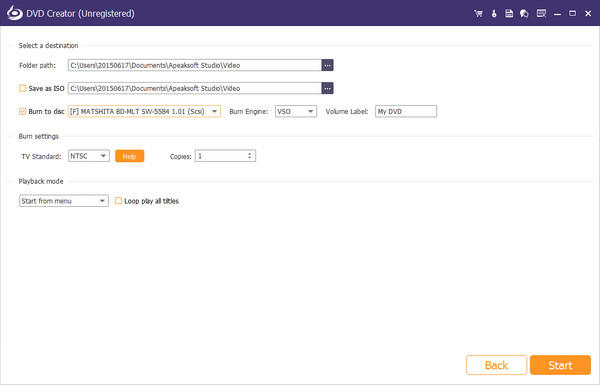
When you run DVD Creator on your computer, you need to select "DVD Disc" in the main interface. Click "Add Media File(s)" to add videos files to this software. After that, you are optional to edit the video, audio, subtitle, etc. When you have done the video editing, you are able to edit menu from the templates or customize the menu y yourself. When all those have been done, just click "Burn" to select the output format and "Start" to start the burning process.
Function 2. How to burn video to Blu-ray
Still you need to run DVD Creator on your computer. In the main interface, select "Blu-ray Disc". Similar to creating DVD, you are able to edit video effects and menu before burning Blu-ray. In the last step, you need to select output format from Blu-ray disc/folder/ISO file and start to create video to Blu-ray.


 iPhone Data Recovery
 iOS System Recovery
 iOS Data Backup & Restore
 iOS Screen Recorder
 MobieTrans
 iPhone Transfer
 iPhone Eraser
 WhatsApp Transfer
 iOS Unlocker
 Free HEIC Converter
 Android Data Recovery
 Broken Android Data Extraction
 Android Data Backup & Restore
 Phone Transfer
 Data Recovery
 Blu-ray Player
 Mac Cleaner
 DVD Creator
 PDF Converter Ultimate
 Video Converter Ultimate
 Video Editor
 Screen Recorder
 PPT to Video Converter
 Slideshow Maker
 Free Online Video Converter
 Free Online Audio Converter
 Free Online Audio Recorder
 Free Online Video Compressor
 Free Online Image Compressor
 Free Online PDF Compressor
 Free Online HEIC Converter
 Free Online Screen Recorder
 Free Online Video Joiner
 iPhone Screen Lock
 PicSafer
 Puzzle Game Cube